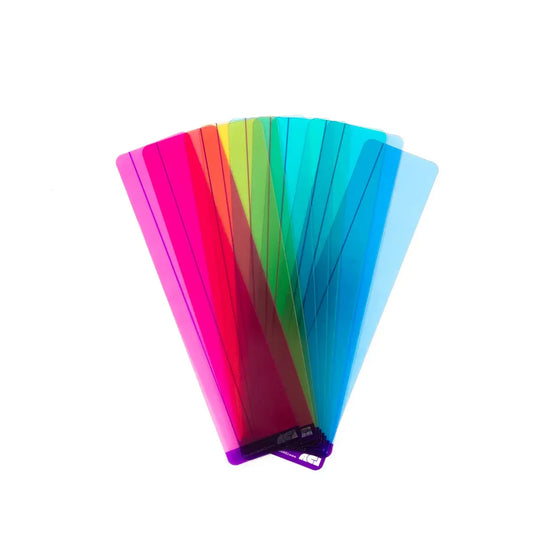
Reading rulers for visual stress are discreet coloured plastic strips that reduce page glare and guide the eye along each line of text, helping readers with Irlen's syndrome, Meares-Irlen Syndrome and visual stress-related reading difficulties. Our SEND range includes plain window and duo window reading rulers from Crossbow Education, trusted by SENCOs, teachers and parents across the UK.
Read moreRead less
The reading ruler was patented by Crossbow Education in 2004 as a more discreet alternative to the full A4 coloured overlay, and it has since become the most widely used visual stress intervention in UK schools. Each ruler is a flexible 205mm x 74mm transparent plastic strip, tinted in a scientifically selected colour and overprinted with tracking lines that help the reader stay on the line they are reading.
What are reading rulers and how do they help with visual stress?
A reading ruler is a tinted plastic strip, about the size of an eight-inch ruler, that sits directly on the page and filters the light reflected from the paper. For pupils with visual stress or Irlen's syndrome, reducing the black-and-white contrast can stop letters appearing to move, blur or swim. The two tracking lines add a physical anchor for the eye, which supports fluency and reduces the mid-line skipping that is common in both visual stress and visual stress with co-occurring dyslexia.
How do you choose the right colour reading ruler?
There is no single "best" colour for visual stress. The optimum tint is individual and needs to be tested. Research from Professor Arnold Wilkins at the University of Essex established that a spectrum of scientifically selected colours, rather than one or two standard shades, is needed to cover the range of visual processing profiles. Our Crossbow Education range includes mixed colour packs so a SENCO or parent can trial each colour with a pupil for ten to fifteen minutes and identify the shade that gives the clearest, most comfortable reading experience.
Plain window or duo window rulers - which design should I choose?
Plain window reading rulers have a single, uninterrupted reading window with a tracking line near the edge, and suit confident readers who want the tint without the text being split across two windows. Duo window rulers divide the strip into a narrow 10mm window for single-line work and a broader 30mm window for paragraphs, diagrams and tables, and are generally recommended for younger readers and less confident readers who need the extra line-by-line focus. Many SEND classrooms stock both designs so pupils can self-select.
Reading rulers for schools and SEND provision
Reading rulers are one of the most cost-effective tools a SENCO can add to a school's SEND provision. They are portable, require no training to use, and slot neatly into a pencil case or exercise book. Schools typically buy mixed-colour class packs for visual stress screening, and individual rulers in the pupil's chosen colour as an ongoing intervention. The Dyslexia Shop offers 30-day credit accounts for UK schools, and we are happy to help you combine reading rulers with A4 coloured overlays or tinted exercise books for a fuller visual stress support package.
-
What is a reading ruler?
A reading ruler is a small tinted plastic strip, around 205mm x 74mm, that readers place over a line of text to reduce glare and guide the eye. Unlike a full A4 coloured overlay, it is discreet and portable enough to keep in a pencil case or book. The Crossbow Eye Level Reading Ruler design, used throughout our range, was the Education Resources Awards SEN Resource of the Year in 2014.
-
How do reading rulers help with visual stress?
Reading rulers reduce the high-contrast glare of black text on white paper, which is the trigger for many symptoms of visual stress and Irlen's syndrome. Around 1 in 5 people experience some degree of visual stress, and for these readers a tinted strip can stop text from blurring, moving or creating white "rivers" down the page. The tracking lines also help the eye stay on the correct line of text.
-
What is the best colour reading ruler for visual stress or Irlen's syndrome?
The best colour is individual to each reader and needs to be trialled. Research by Professor Arnold Wilkins at the University of Essex established that a broad spectrum of tints, rather than one or two standard shades, is needed to cover the range of visual processing profiles. We recommend trialling each colour for ten to fifteen minutes and choosing the shade that feels calmest and clearest.
-
What is the difference between a reading ruler and a coloured overlay?
A reading ruler is a narrow tinted strip that covers a single line or paragraph at a time, whereas a coloured overlay is a full A4 tinted sheet that covers an entire page. Many readers use the overlay at home or for extended reading and the reading ruler in lessons, where its smaller size is more discreet.
-
Can schools order reading rulers in bulk for SEND provision?
Yes. The Dyslexia Shop is a specialist UK SEND supplier and offers 30-day credit accounts to schools, colleges and local authorities, with no minimum order. Most SENCOs stock a mixed-colour class pack for visual stress screening plus single colours for ongoing individual use. Email sales@thedyslexiashop.co.uk or place an order online using a school purchase order.
-
At what age can a child start using a reading ruler?
Reading rulers are suitable from Reception and EYFS upwards, and are used by pupils through Key Stage 1, Key Stage 2, secondary school, further education and into adulthood. Younger readers often prefer the duo window design because the narrow strip isolates a single line. Confident readers from around Key Stage 2 upwards tend to prefer the plain window design for uninterrupted text flow.
-
Are reading rulers allowed in UK exams?
Reading rulers and coloured overlays are generally permitted as a candidate's normal way of working in UK exams, provided the pupil uses them routinely in classroom work. SENCOs and access arrangement coordinators should check the current JCQ General Regulations and the JCQ Access Arrangements and Reasonable Adjustments guidance each academic year to confirm the specific conditions.
Need advice? Call us to have a chat - 01394 671 818 or email us hello@thedyslexiashop.co.uk