


English Type
Englishtype Junior: Dyslexia-Friendly Touch Typing for Kids (Windows)
Englishtype Junior: Dyslexia-Friendly Touch Typing for Kids (Windows)
SKU:SW048
Couldn't load pickup availability


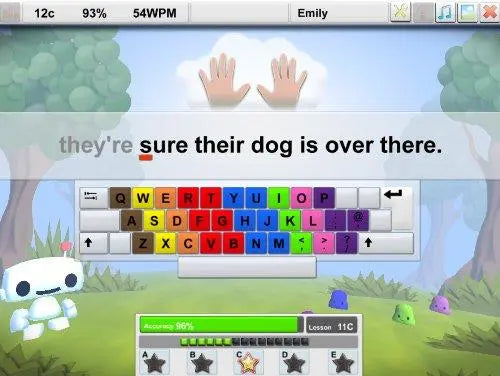
Touch typing for children, designed with dyslexia in mind
Englishtype Junior is touch typing software for Windows that teaches children up to 11 years old to type without looking at the keyboard. Each finger is linked to a colour, so children learn which finger presses which key quickly and build reliable muscle memory. The program was designed to be inclusive, challenging confident learners while giving extra support to children with special educational needs, including dyslexia.
How Englishtype Junior works
The course is built around 12 lesson levels. Each level has five sections: finger movements, words, phrases and two sets of extra practice. After every level a new game unlocks, and the games have no onscreen keyboard, so they test what has genuinely been learned. Around halfway through, Booster exercises repeat high frequency letter patterns and words to build speed. Two TypeTests, one halfway and one after lesson 12, award printable Bronze, Silver or Gold certificates.
Key accuracy is shown at the end of every lesson, highlighting the keys that need more work. Optional spelling lessons cover high frequency words across five activities: children see, hear, read and type each word.
For schools
- Whole-class or small-group use. Self-directed learning means pupils can work at the same time, each at their own pace.
- Fits KS1 and KS2 provision. Suitable for Quality First Teaching and for targeted keyboarding or literacy interventions within the graduated approach.
- Supports pupils with SEN and EHCPs. Where a plan recommends keyboard skills or word processing, Englishtype Junior gives a structured route to fluent typing.
- Built-in progress evidence. Accuracy reports, TypeTests and certificates give staff clear evidence of progress.
For parents and home use
- Short, rewarding sessions. Trophies, rosettes, stars and daily diary stickers keep children coming back.
- Less adult help needed. Instructions are both spoken and written, so children can practise independently.
- Builds confidence for homework. Fluent typing makes writing on a computer quicker and less frustrating.
- Fun to personalise. Children earn new outfits for Qwerty, the program's character, as they progress.
Why it suits children with dyslexia
Many children with dyslexia find handwriting and spelling slow and tiring, which can hold back what they are able to put on the page. Englishtype Junior uses a multi-sensory approach with strong colour coding, a visually simple screen, a choice of background colours and highly structured content. The spelling lessons let dyslexic learners hear a word, see it, then type it from memory, reinforcing spelling through movement as well as sight and sound.
Why touch typing matters
When typing becomes automatic, children no longer have to think about where each letter is. That frees up attention for planning, spelling and expressing ideas. Primary age is a good time to learn, before two-finger typing habits become fixed.
Englishtype Junior is a Windows download and needs a PC or laptop with a physical keyboard. If you are buying for several computers in a school, please get in touch and we will be happy to help.
- Colour-coded finger system: links each finger to a colour so children learn key positions quickly.
- 12 lesson levels: each with five sections covering finger movements, words, phrases and extra practice.
- 6 games: unlocked level by level, with no onscreen keyboard to test genuine learning.
- Booster exercises: build speed by repeating high frequency letter patterns and words.
- Optional spelling lessons: five activities focused on high frequency words.
- Numbers and symbols lessons: extend skills beyond the letter keys.
- 2 TypeTests with printable certificates: Bronze, Silver and Gold medals at halfway and course completion.
- Accessibility features: spoken and written instructions, choice of background screen colours, simple uncluttered layout.
- Rewards: trophies, rosettes, stars, daily diary stickers and character outfits.
- Age suitability: children up to 11 years, primary school (KS1 and KS2).
- Format: digital download for Windows PCs and laptops.
- Colour coding that sticks. Each finger has its own colour, helping children learn key positions quickly and build lasting muscle memory.
- Designed with dyslexia in mind. Spoken and written instructions, uncluttered screens and adjustable background colours reduce barriers for dyslexic learners.
- Works in class and at home. Children learn at their own pace, so one program suits mixed-ability classes and independent practice.
- Motivation built in. Games, certificates, trophies and daily stickers keep primary-age children engaged through all 12 levels.
- Specialist UK supplier. Supplied by The Dyslexia Shop, a family-run retailer focused on dyslexia and SEND support.
What's in the Box
- 1 x Englishtype Junior Windows download (digital product, nothing is posted)
Software, Apps and Updates
Windows software supplied as a download. Number of computers covered by one licence: [UNVERIFIED - please check]. Free updates: [UNVERIFIED - please check].
Compatibility
Works on Windows PCs and laptops with a physical keyboard. Supported Windows versions: [UNVERIFIED - please check against the publisher's current system requirements]. This version does not run on Mac, Chromebook, iPad or Android tablets.
Delivery and Returns
This is a digital product. Download details are supplied after purchase [UNVERIFIED - please confirm delivery method]. See our Delivery and Returns page for full details.
Accessibility Notes
Includes spoken and written instructions, a choice of background screen colours and a visually simple layout.
- What is Englishtype Junior?
Englishtype Junior is Windows touch typing software that teaches children up to 11 to type using colour-coded keys and fingers. It combines 12 lesson levels, six games, Booster speed exercises, optional spelling lessons and two typing tests, with Bronze, Silver and Gold certificates to mark progress. Children work at their own pace, so it suits mixed-ability groups as well as individual learners at home. - Is Englishtype Junior suitable for children with dyslexia?
Yes, Englishtype Junior includes features that help dyslexic children, such as strong colour coding and both spoken and written instructions. Screens are visually simple, background colours can be changed and content is highly structured. Optional spelling lessons focus on high frequency words, supporting the spelling difficulties many children with dyslexia experience. - What age is Englishtype Junior for?
Englishtype Junior is recommended for children up to 11 years old, covering the primary school years. Primary age is a good time to learn touch typing, before two-finger typing habits become fixed. Older pupils and adults may prefer a typing tutor designed for their age group. - What computers does the Englishtype Junior Windows download work on?
This version works on Windows PCs and laptops with a physical keyboard. It does not run on Mac, Chromebook, iPad or Android tablets. Please check your computer's Windows version against the publisher's current system requirements before buying, or contact us and we will help. - Can Englishtype Junior be used in a primary school classroom?
Yes, its self-directed design lets a whole class work at the same time, each child at their own pace. It supports Quality First Teaching and can form part of a targeted keyboarding or literacy intervention for pupils with SEN or an EHCP. Accuracy reports after each lesson show staff which keys need more practice. - How does Englishtype Junior help my child at home?
Englishtype Junior turns typing practice into short, rewarding sessions children can manage on their own. Trophies, rosettes, daily diary stickers and outfits for the Qwerty character keep motivation high, while spoken instructions mean less adult help is needed. It builds a skill that makes homework on a computer quicker and less frustrating. - How long does it take to learn to touch type with Englishtype Junior?
Progress depends on how often a child practises, and short regular sessions work better than occasional long ones. The program has 12 lesson levels, with a progress test halfway and a final test after lesson 12. A Gold medal on the final TypeTest shows that typing muscle memory is well established. - Can learning to touch type help my child in exams?
Exam access arrangements, including use of a word processor, are decided by the exam centre in line with current JCQ regulations. Where a pupil uses a word processor as their normal way of working, fluent touch typing helps them make good use of that arrangement. Englishtype Junior itself is a learning program and is not used in exams. See the JCQ access arrangements page for details.