


KAZ Type
KAZ SEN/Dyslexia Family Edition - 5 Touch Typing Licences
KAZ SEN/Dyslexia Family Edition - 5 Touch Typing Licences
SKU:EL525-ONLINE
Couldn't load pickup availability


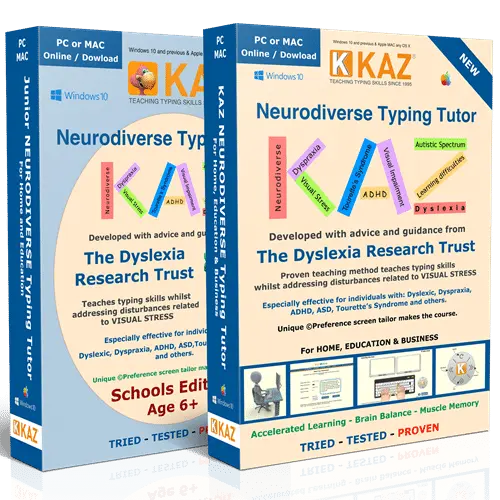
The KAZ SEN/Dyslexia Family Edition is a touch typing program that teaches up to 5 members of the same family to type, with dyslexic and dyspraxic learners in mind. It was developed by KAZ Type Limited with advice and guidance from the Dyslexia Research Trust. Each person chooses the Adult or Junior version, so children and parents can learn side by side at their own pace.
How the KAZ Family Edition helps
Before the course begins, a preference screen lets each learner choose a dyslexia-friendly typeface, font size, font colour, background or filter colour and keyboard style. Once they can read the sample text comfortably, those settings apply throughout the course.
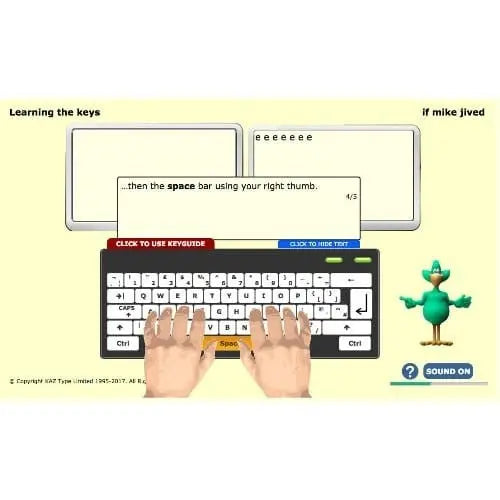
KAZ teaches the A to Z keys using specific combinations of just 11 words in 5 short phrases, rather than long, repetitive drills or games. Instruction is spoken and written, and the course is split into short modules. KAZ's tests show most users complete the A to Z keys in around 90 minutes, although some take longer. KAZ suggests allowing an average of 4 hours, plus practice time, for the full keyboard.
Online or download: which suits your family?
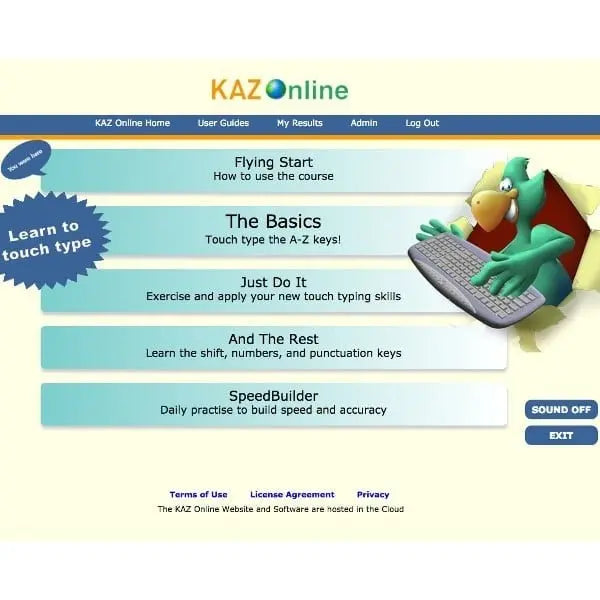
The online edition includes 5 annual licences and an administrator panel, so you can follow each person's progress. You can also upload your child's weekly school spelling list or any words they find tricky, which then become part of their typing practice. It runs in a web browser wherever there is an internet connection.
The download edition includes 5 download licences for Mac or Windows, each with a 10-year licence on the computer it is installed on and one year of free help and support. Once installed, no internet connection is needed.
For parents and home learning
- One purchase for the whole family. Five licences mean siblings and parents can all learn, which KAZ describes as 5 licences for the price of 3.
- Practise school spellings while typing. With the online edition, you can add your child's weekly spelling list to their practice.
- Learn at home, at their own pace. KAZ designed the course to be used independently, in short, manageable sessions.
- See how everyone is getting on. The online admin panel shows progress, statistics and bookmarks for each learner.
Support for dyslexia
Many dyslexic children find black text on a bright white screen uncomfortable, with letters that seem to blur or move. The preference screen was developed with the Dyslexia Research Trust to reduce these visual disturbances. KAZ's method also builds muscle memory, so familiar words become a pattern of finger movements, which KAZ says reduces the likelihood of transposing and misspelling words.
Support for dyspraxia (DCD)
KAZ lists its SEN/Dyslexia Edition as suitable for individuals with dyspraxia. The method trains the fingers of both hands to work symmetrically, building technique step by step through short modules. For children who find handwriting slow or tiring, typing offers another way to get their ideas down.
Why touch typing matters
Touch typing is a life skill that supports homework, coursework and later study. KAZ states that the Open University ran a year-long study of the KAZ method and went on to use it with its students for over 14 years.
If more than one person in your family would like to learn to type, the KAZ SEN/Dyslexia Family Edition is a simple, good-value way to start together. If you have any questions about the online or download version, our team is happy to help.
- 5 licences: each family member chooses the Adult or Junior version
- Preference screen: choose a dyslexia-friendly typeface, font size, font colour, background or filter colour and keyboard style
- Developed with the Dyslexia Research Trust: designed to reduce visual disturbances linked to visual stress
- 11 words in 5 phrases: teaches the A to Z keys without repetitive drills or games
- Spoken and written instruction: audio tuition with speaking keys, plus a text-only option
- Online edition: 5 annual licences, administrator panel showing progress, statistics and bookmarks, and upload of spelling lists or problem words
- Download edition: 5 download licences for Mac or Windows, 10-year licence per computer, one year of free help and support, and free updates
- Age: suitable from age 6, with Junior and Adult versions
- Region settings: UK and US QWERTY keyboard support, with English or US accent audio
- Format: digital product; nothing is posted
- Five learners, one purchase. Siblings and parents each get their own licence, choosing the Adult or Junior version.
- Built around dyslexic learners. Developed with the Dyslexia Research Trust, with on-screen settings that reduce glare and visual disturbance.
- Typing practice that supports spelling. The online edition lets you add your child's weekly school spelling list to their practice.
- Online or download. Choose browser-based access with a parent admin panel, or offline downloads for Mac or Windows.
- UK specialist supplier. Supplied by The Dyslexia Shop, a family-run UK retailer focused on dyslexia and learning differences.
Software, Apps and Updates
The online edition runs in a web browser with nothing to install and needs an internet connection each time it is used. The download edition is installed on each computer; internet access is only needed to download and activate it, after which it works offline. KAZ states that if a computer or hard drive fails, the file can be downloaded again without re-registering.
Compatibility
KAZ states the online edition works on Windows, Mac and Chromebook computers. The download edition is available for Mac or Windows and runs only on the computer where each licence is installed and activated.
Delivery and Returns
This is a digital product, so nothing is posted. See our Delivery and Returns page for full details.
Accessibility Notes
Each learner can set their preferred typeface, font size, font colour and background colour before starting, and these settings apply throughout the course. Instruction is available as audio and as text only.
- What is the KAZ SEN/Dyslexia Family Edition?
It is a touch typing program with 5 licences for members of the same family, designed with dyslexic learners in mind. Each person chooses the Adult or Junior version. It is available as a 12-month online licence with a parent admin panel, or as a download for Mac or Windows. - Is the KAZ Family Edition good for children with dyslexia?
Yes, the SEN/Dyslexia Edition was developed with the Dyslexia Research Trust for dyslexic users. Each learner can choose the typeface, font size, colours and background to reduce glare and visual disturbance. With the online edition, you can also add your child's school spelling list to their typing practice. - Can KAZ help my child with dyspraxia learn to type?
KAZ lists its SEN/Dyslexia Edition as suitable for individuals with dyspraxia. The course trains both hands to work symmetrically, step by step, in short modules. Typing can also give children who find handwriting tiring another way to record their ideas. - How many people can use the KAZ Family Edition?
The Family Edition includes 5 licences, so up to 5 family members can each have their own. Every person chooses either the Adult or Junior version. KAZ describes it as 5 licences for the price of 3. - What age is the KAZ Family Edition suitable for?
KAZ states its typing tutor is suitable from age 6. Younger children can use the Junior version, while older children and parents can use the Adult version. This makes it suitable for families with children of different ages. - Should I choose the online or download Family Edition?
Choose online if you want a parent admin panel and the option to upload spelling lists; it lasts 12 months and works in a web browser. Choose download if you prefer offline use; each licence lasts 10 years on the computer it is installed on, with one year of support. - Can I see how my children are progressing?
Yes, with the online edition. Its administrator panel shows each learner's progress, statistics and bookmarks. The download edition records speed and accuracy on each computer but does not include the admin panel.