


KAZ Type
KAZ SEN/Dyslexia Touch Typing - School Download Licences
KAZ SEN/Dyslexia Touch Typing - School Download Licences
SKU:EL526-ONLINE-1
Couldn't load pickup availability


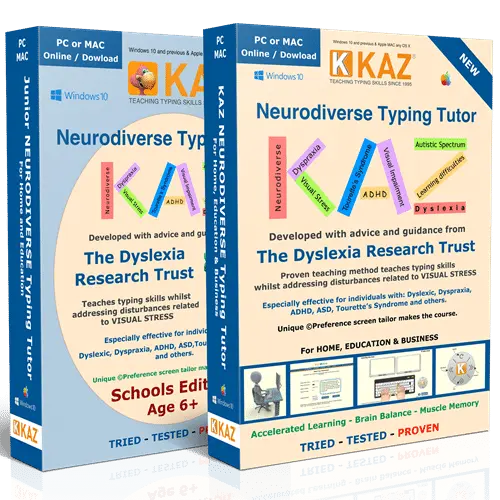
KAZ SEN/Dyslexia School Download Licences are per-workstation touch typing licences for schools that need software installed locally rather than run online. KAZ's education licences are suitable for mainstream, SEN and visually impaired learners. They include a preference screen developed with the Dyslexia Research Trust to reduce visual disturbance for dyslexic pupils.
Why schools choose the download licence
KAZ offers download files for schools where internet access is restricted. Internet access is only needed for installation and activation, after which the software runs securely offline with no data transfer. Each licence lasts 5 years, runs on Mac or PC, allows concurrent users and includes a reset facility.
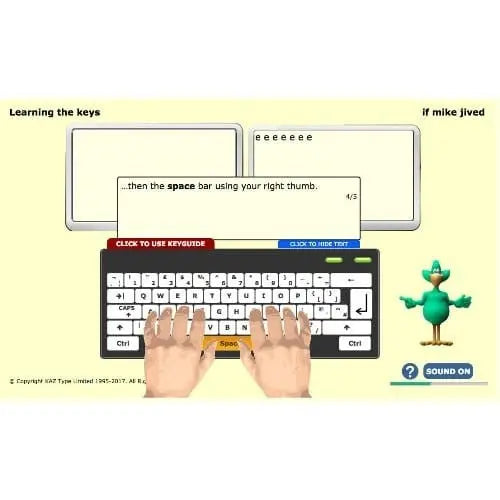
KAZ teaches the A to Z keys using specific combinations of just 11 words in 5 short phrases, without games or repetitive drills. KAZ's tests show most users complete the A to Z keys in around 90 minutes, although some take longer. KAZ suggests allowing an average of 4 hours, plus practice time, for the full keyboard.
For schools and SEN provision
- Works where internet is limited. Once installed and activated, the software runs offline on each workstation.
- Inclusive for the whole class. KAZ states its education licences suit mainstream, SEN and visually impaired learners, so pupils can work together.
- Suitable across year groups. KAZ states its typing tutor is suitable from age 6, covering primary and secondary pupils.
- Supports targeted intervention. Pupils can work independently, as part of a class, or one-to-one with a teaching assistant.
- Volume pricing. Per-workstation prices fall from £120 for a single workstation to £50 each for 26 to 50 workstations.
Support for dyslexic pupils
Dyslexic pupils can find black text on a bright white screen uncomfortable, with letters that seem to blur, crowd or move. The preference screen lets each pupil choose a dyslexia-friendly typeface, font size, font and background colour, and keyboard style, and those settings apply throughout the course. KAZ's method also builds muscle memory, which KAZ says reduces the likelihood of transposing and misspelling words.
Support for pupils with dyspraxia (DCD)
KAZ lists its SEN/Dyslexia Edition as suitable for individuals with dyspraxia. The method trains the fingers of both hands to work symmetrically, building technique through short, structured modules. For pupils who find handwriting slow or tiring, typing offers an alternative way to record their work.
Evidence and context
KAZ states that the Open University ran a year-long study of the KAZ method and went on to use it with its students for over 14 years. KAZ is a member of BESA, the trade association for UK education suppliers.
If you would like help choosing the right number of workstation licences, or comparing download and online school licences, our team is happy to advise. We can also provide a quote for your school or trust.
- Licence type: education download licence, priced per workstation; 5-year licence, not transferable
- Pricing tiers (ex VAT): single workstation £120; 5 to 10 workstations £90 each; 11 to 25 workstations £75 each; 26 to 50 workstations £50 each
- Platforms: Mac or PC; activation email valid for the number of licences purchased
- Internet: only needed for installation and activation; runs offline with no data transfer
- Concurrent users: supported, with a reset facility and full score history
- Preference screen: dyslexia-friendly typeface, font size, font colour, background or filter colour and keyboard style
- Developed with the Dyslexia Research Trust: designed to reduce visual disturbances linked to visual stress
- Instruction: audio tuition with speaking keys, plus a text-only option
- Teacher resources: video, brochure and guides
- Age: suitable from age 6, across primary and secondary
- Region settings: UK and US QWERTY keyboard support, with English or US accent audio
- Runs offline in school. Internet access is only needed to install and activate, so it suits schools with restricted networks.
- Inclusive for dyslexic pupils. The preference screen, developed with the Dyslexia Research Trust, reduces glare and visual disturbance.
- Five-year licences. Each workstation licence lasts 5 years on Mac or PC, with concurrent users and a reset facility.
- Lower cost at volume. Per-workstation prices fall to £50 each for 26 to 50 workstations.
- UK specialist supplier. Supplied by The Dyslexia Shop, a family-run UK retailer focused on dyslexia and SEND.
Software, Apps and Updates
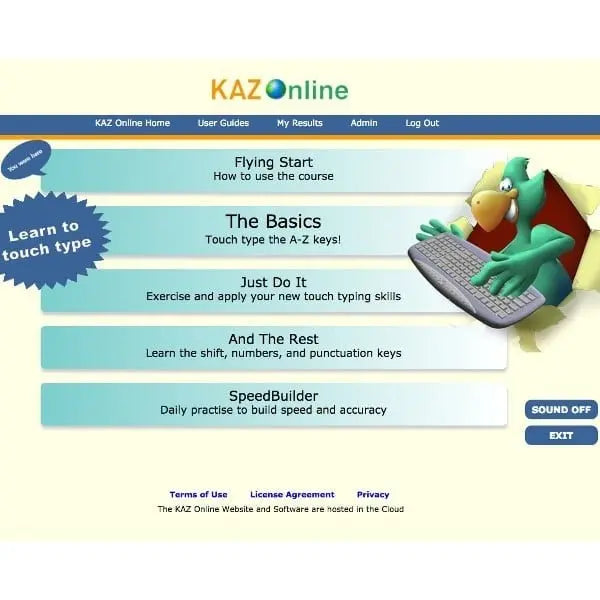
This is installable software, not a browser-based program. Internet access is only needed for installation and activation. For installing on multiple machines, KAZ offers silent install files on request. The download licence does not include KAZ's online teacher admin panel; schools needing student lists and real-time progress tracking should consider KAZ's online school licences.
Compatibility
Licences are available for Mac or PC. Each licence runs on the workstation where the software is installed and is not transferable.
Delivery and Returns
This is a digital product, so nothing is posted. See our Delivery and Returns page for full details.
Accessibility Notes
Pupils can set their preferred typeface, font size, font colour and background colour before starting, and these settings apply throughout the course. Instruction is available as audio and as text only.
- What are KAZ SEN/Dyslexia school download licences?
They are per-workstation touch typing licences that schools install on their own Mac or PC computers. Each licence lasts 5 years and runs offline after activation. KAZ states its education licences are suitable for mainstream, SEN and visually impaired learners. - Is KAZ suitable for dyslexic pupils in our school?
Yes, KAZ's SEN/Dyslexia Edition was developed with the Dyslexia Research Trust for dyslexic users. Each pupil can choose the typeface, font size, colours and background to reduce glare and visual disturbance. KAZ's method also builds muscle memory, which KAZ says reduces the likelihood of transposing and misspelling words. - Does KAZ help pupils with dyspraxia?
KAZ lists its SEN/Dyslexia Edition as suitable for individuals with dyspraxia. The course trains both hands to work symmetrically through short, structured modules. Typing can give pupils who find handwriting slow or tiring another way to record their work. - What year groups is KAZ suitable for?
KAZ states its typing tutor is suitable from age 6. This covers pupils from KS1 through primary and secondary school. KAZ also states its course can be used independently, as part of class teaching, or one-to-one for pupils who need extra support. - Should our school choose download or online KAZ licences?
Choose download licences if your network restricts internet access; they run offline for 5 years per workstation. Choose online licences if you want KAZ's teacher admin panel, student list uploads and real-time progress tracking. Online licences are annual and priced by number of users. - How is the per-workstation price worked out?
The price per workstation falls as you buy more. A single workstation costs £120, 5 to 10 cost £90 each, 11 to 25 cost £75 each, and 26 to 50 cost £50 each. All prices are shown ex VAT. - Can pupils use typing in exams?
Exam use is decided by the exam centre in line with current JCQ regulations. Where a pupil has an identified need, using a word processor may form part of their normal way of working in the classroom and in exams, in line with JCQ regulations. KAZ teaches the typing skill and is not itself used in exams.